Skip to content
  1. Blog
  2. Mixing

Mixing#Mixing#Effects#Calculation

Calculating delay time from BPM: dotted eighths and triplets by hand

To lock a delay to the song, calculate the time from the BPM. Formulas for quarter, eighth, dotted-eighth and triplet delays in milliseconds, a table for 120 BPM, and what to adjust when the delay gets muddy.

Written by the site’s operator2 min read
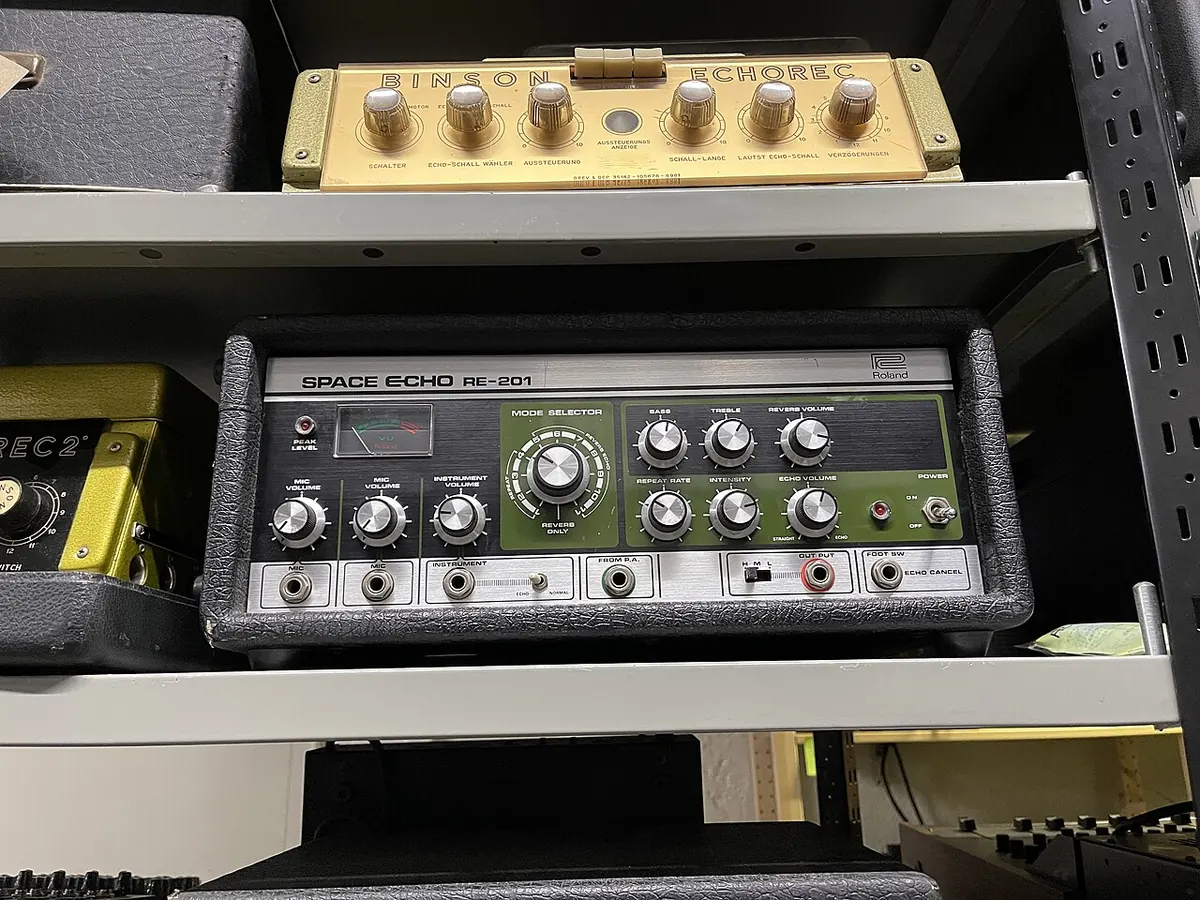
Roland Space Echo RE-201
The RE-201 tape echo, released in 1974. Playback heads read a loop of tape, and the tape speed set the delay time.Photo: 1904.CC / CC BY 4.0 / Wikimedia Commons

You add a delay and the repeats pile up behind the vocal or guitar, fighting the groove. Matching the delay time to the BPM sorts it out quickly.

A delay repeats the incoming sound a little later. Where reverb adds a room-like wash, delay makes the repeats audible as repeats. Set their spacing to the tempo and they become part of the rhythm.

Start with the quarter note

BPM is beats per minute, and a minute is 60,000 milliseconds, so one quarter note is:

quarter-note delay (ms) = 60,000 ÷ BPM

At 120 BPM that is 500 ms. An eighth is half that, a sixteenth half again. A dotted eighth is 1.5 eighths. A triplet fits three notes into the space of two.

NoteFormulaAt 120 BPM
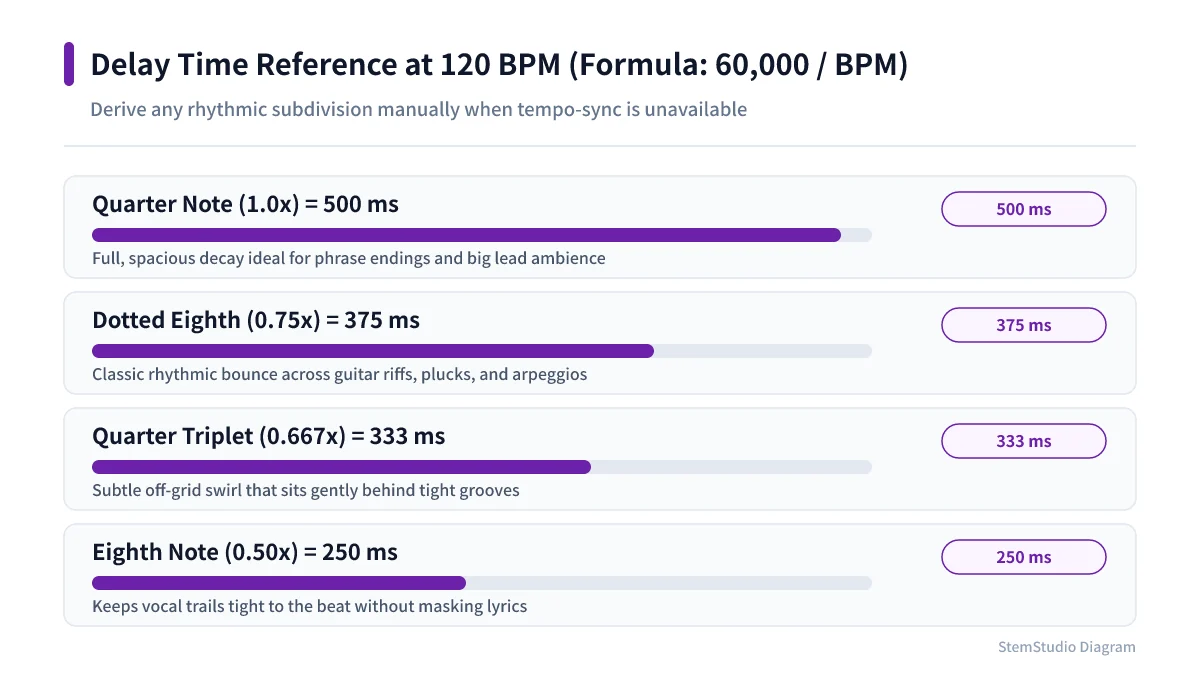
Quarter60,000 ÷ BPM500 ms
Dotted eighth45,000 ÷ BPM375 ms
Quarter-note triplet40,000 ÷ BPM≈333 ms
Eighth30,000 ÷ BPM250 ms
Eighth-note triplet20,000 ÷ BPM≈167 ms
Sixteenth15,000 ÷ BPM125 ms
Sixteenth-note triplet10,000 ÷ BPM≈83 ms
Different BPM, different times. If you do not know the song’s tempo, BPM detection measures it from the file.
Delay time chart calculated from BPM 120 using 60,000 divided by BPM for quarter, dotted eighth, triplet, and eighth notes
Divide 60,000 by your track BPM to get the quarter-note delay in ms, then scale by 0.75 for dotted eighths or 0.5 for eighths.

Why dotted eighths suit guitar and vocals

A dotted eighth returns a little later than an eighth — 375 ms at 120 BPM. The repeats land between the notes you played and add rhythmic motion, letting a guitar line or a held vocal word ring on while keeping the pulse.

It does not automatically add depth, though. Busy lines get cluttered as the repeats overlap. Start with low feedback and listen to how many repeats you actually hear.

Tempo sync versus milliseconds

Some delays sync to the BPM so you just pick a note value; others take milliseconds. Gear without sync needs the number typed in.

For songs with tempo changes, or when you want the repeats slightly off the grid, milliseconds give finer control — say, a touch under 500 ms to tighten the gap. Use the calculation as a starting point and finish by ear.

Three settings to check when it gets muddy

  • Feedback — how many repeats remain. More feedback, longer tail, more overlap on busy parts.
  • Mix level — too much delay blurs the performance. Start low and lift it only where needed.
  • Tone of the repeats — repeats as bright and bassy as the original crowd the mix. Trim lows and highs on the delay to add depth without covering the source.

Calculate first, decide by ear

Tempo sync is a quick way to find times that fit the rhythm, not the only right answer. Depending on the groove, a slightly offset time can feel better.

Once you can get times from the BPM, you no longer need to audition every preset. Work out the quarter note, halve it or multiply by 1.5, aim with numbers and judge in the track.
Tools for this article

Share this article
Share on X

Read next

Mixing

What reverb is: giving a voice a room to sit in

Reverb adds the reflections a room would give a sound. What pre-delay, early reflections and decay time mean, how room, hall and plate differ, why reverb goes on a send, and starting points for blending a cover vocal into a backing track.

#Mixing#Reverb
Covers

Change a Song to a Target BPM

Calculate the playback-speed multiplier for a target BPM, check for half-time or double-time detection, then change a song’s tempo while keeping its key.

#BPM#Tempo change
Mixing

Why do I hear myself late while recording? Buffer size and latency

There is a gap between playing a note and hearing it back. The cause may be your buffer size or driver. What 64, 128, 256 and 512 samples mean in milliseconds, why recording and mixing want different settings, and what to check when the audio crackles.

#Recording#Settings
Mixing

Should you record as loud as possible? Why to stay away from 0 dBFS

Your meters do not need to hit the top. What 0 dBFS, clipping and headroom mean in digital recording, and how to set input gain step by step.

#Recording#Mixing
Mixing

Before you widen the stereo: a mix that survives mono

Before reaching for a stereo widener, check that parts do not vanish or thin out in mono. The basics of phase cancellation and quick mono checks to make while mixing.

#Mixing#Stereo
Mixing

How close to a DAW is Suno Studio 2.0? The autumn 2026 updates

Suno Studio 2.0 has grown from generating songs into a place to edit them, with MIDI, effects and automation. The October 2026 clip-editing changes and the Suno MCP beta, from Suno’s own notes, and how it fits next to a regular DAW.

#News#AI

All articles