 Asteria
Type it all, convert once.
らいげつからはじまる…しりょうをまとめます
→ 来月から始まる新しいプロジェクトの計画について部長と相談した結果…
Even 107 characters typed in one go are segmented and converted correctly with a single Space.
JAPANESE INPUT FOR WINDOWS · v4.0.0 STABLE
Asteria reads long sentences and the sentence before, so the first candidate is the right one. Free and open source. Your text never leaves your PC.
Spot the mistake, move back, pick another candidate — those seconds add up dozens of times a day. Asteria combines Mozc's dictionary conversion with AI running on your PC's GPU, and focuses on making the first candidate right.
らいげつからはじまる…しりょうをまとめます
→ 来月から始まる新しいプロジェクトの計画について部長と相談した結果…
Even 107 characters typed in one go are segmented and converted correctly with a single Space.
週末は美術館で絵を かんしょうする
→ 鑑賞する (appreciate)
子どものけんかに親が かんしょうする
→ 干渉する (interfere)
Same reading, different word — chosen from context.
ぎっとはぶにれぽじとりを…
→ GitHubにレポジトリを…
GitHub and Zoom come out in English spelling, not katakana.
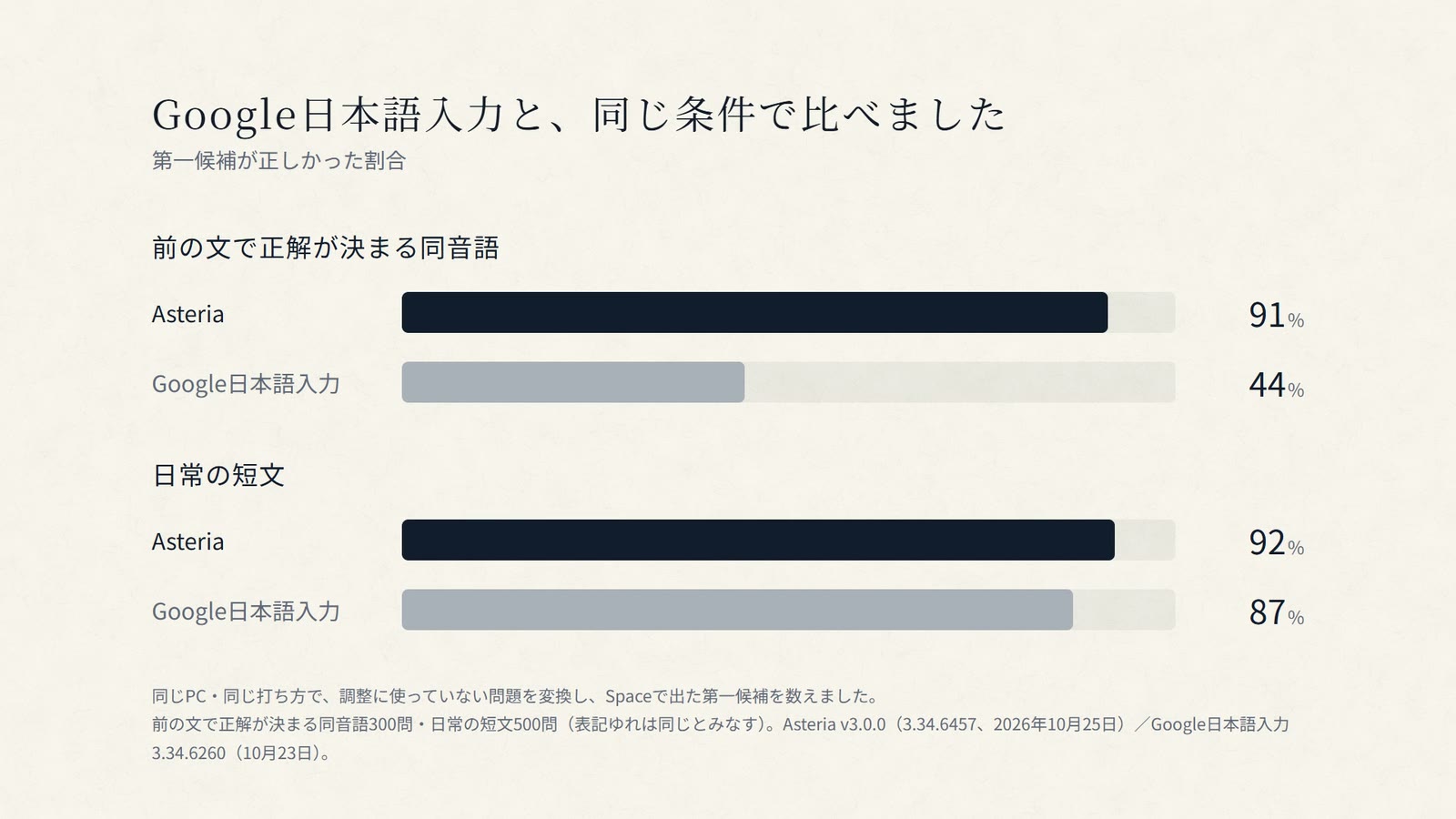
Homophones decided by the previous sentence (300 items)
Everyday short sentences (500 items, spelling variants counted as equal)
Same PC, same typing; items not used for tuning; the first candidate after Space was counted. Asteria v3.0.0 (October 25, 2026) / Google Japanese Input 3.34.6260 (October 23). Asteria still errs on homophones that depend on meaning and on proper nouns. Method and full results →
It never asks you to close open apps. Updates from v3.0.0 onward need no restart (updating from v2.0.0 or earlier asks for one restart at the end). Uninstalling keeps what Asteria has learned, so reinstalling picks up where you left off.
The dictionary and AI ship inside the installer; conversion needs no network. In password fields, Asteria is built to stop reading context, AI and learning.
If the GPU is unavailable or AI is still loading, dictionary conversion keeps you typing.
Source code, evaluation method and failure examples are public.
The settings dashboard shows today's conversions, time to candidates and first-candidate rate — counts and times only.
From v4.0.0 you can turn it on in the “AI変換” settings tab (off by default). When you pause, the text turns into the AI conversion, and Enter commits it as shown. It is always the same as the first candidate you would get with Space. The same tab also offers homophone hints and an experimental option to run the AI on an integrated GPU.
Yes, with the CPU-oriented Low setting. Quality and speed differ from Standard on a dedicated Vulkan GPU with at least 3 GiB VRAM.
The installer is unsigned, so SmartScreen may appear. Confirm it came from the official GitHub Release and check the attached SHA-256, then choose “More info → Run anyway”.
The AI models and runtime are bundled, so there is nothing else to install — no Python or CUDA setup.
Yes. Switch any time with Windows + Space.
Windows 10 1809 or later / Windows 11 (x64), 8 GB RAM (16 GB recommended), about 1.7 GB disk. GPU AI uses a dedicated Vulkan GPU (NVIDIA / AMD / Intel Arc) with 3 GiB+ VRAM; integrated GPUs are not used.
If you like it, a Star on GitHub is the best encouragement to keep going.