The export dialog lists 44.1 kHz, 48 kHz, 24-bit, 32-bit float. Picking the biggest numbers feels safest, but it is not that simple.
The numbers describe different things. Sample rate is how often the sound is measured; bit depth is how finely each measurement records level. Separate the two and the choice gets easy.
Sample rate: measurements per second
44.1 kHz measures the waveform 44,100 times a second; 48 kHz, 48,000 times. The highest frequency it can hold is half the sample rate — about 22.05 kHz and 24 kHz respectively, both comfortably above human hearing.
44.1 kHz is the CD standard and 48 kHz is the norm for film and video. Music only: 44.1 kHz. With video: 48 kHz. In the end, follow whatever your collaborators or client specify.
Bit depth: how finely level is recorded
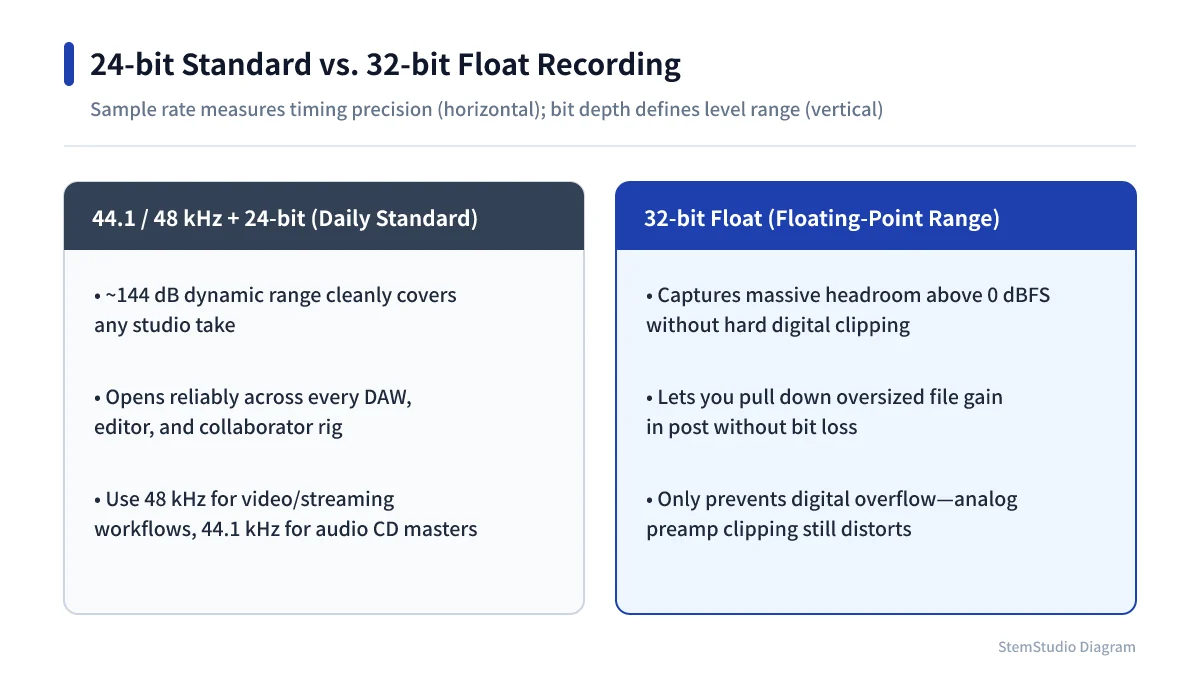
Bit depth sets how many steps each sample’s level can take. More bits, finer steps, less quantisation noise.
For recording and mixing, 24-bit is the practical choice: plenty of noise headroom at a reasonable file size, so you do not need to record near the ceiling (Should you record as loud as possible?).
32-bit float is not 32-bit integer
32-bit float stores audio as floating-point numbers, as DAWs do internally. Unlike 24-bit integer, a signal that gets too loud mid-process can be turned back down later without damage.
Starting points
| Use | Starting setting | Why |
|---|---|---|
| Music recording and production | 24-bit / 44.1 or 48 kHz | 44.1 kHz for music only, 48 kHz with video |
| Audio for video | 24-bit / 48 kHz | The common film and video setting |
| Handing over a mix in progress | 24-bit WAV or 32-bit float WAV | Match the other person’s setup |
| Intermediate files after editing | 32-bit float WAV is an option | Keeps room for level changes |
| CD master | 16-bit / 44.1 kHz | The CD standard; dither when reducing bit depth |
Converting sample rates again and again mid-project adds needless processing. Decide the project standard up front and keep it to the end. If you do need another format or rate, file conversion does it in the browser.
Check the delivery spec before reaching for big numbers
96 or 192 kHz has its uses, but it is not required everywhere; file size, CPU load, plug-in support and compatibility all count.
Decide what you are making and where it is going first. For ordinary music, use 24-bit and choose 44.1 or 48 kHz by purpose; for video, work at 48 kHz and consider 32-bit float for intermediate handovers. That alone removes most of the guesswork.